
As an Amazon Associate, I earn from qualifying purchases. This post contains affiliate links, meaning I may receive a commission at no extra cost to you.
**Featured Items in This Post
The items below are the two products discussed in this article. A mouse and keyboard are among the most frequently used tools in a home office, so choosing comfortable, practical options can make everyday work more enjoyable. For quick access to the product details, see the two featured products below:
👉 Wireless Ergonomic Mouse (paid link)
👉 Mechanical Keyboard (paid link)
Welcome back to FindWithJ.
As remote and hybrid work continue to be part of everyday life, creating a comfortable and organized home office can make daily work more convenient.
Rather than focusing on the latest trends, we look at practical technology and workspace accessories that can address common problems people encounter while working from home.
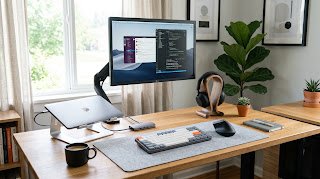
Here are five useful home office tech accessories worth considering for a modern workspace.
Wireless Ergonomic Mouse
Traditional computer mice require the hand to rest in a relatively flat position. For some users, maintaining this position for long periods may feel uncomfortable. This has personally been the case for me during long working hours.
Ergonomic mice are designed to place the hand in a more upright, handshake-like position. This alternative shape may provide a more comfortable grip for people who spend many hours using a mouse.
When choosing one, consider the size and shape of the mouse, button placement, wireless connection, and whether the design feels comfortable for your particular hand.
For a practical option, you can check this Wireless Ergonomic Mouse (paid link).
Mechanical Keyboards with Tactile Switches
The keyboard is one of the most frequently used tools in a computer-based workspace, so its design can have a noticeable effect on the typing experience.
Mechanical keyboards use individual mechanical switches beneath their keys. Tactile switches provide noticeable physical feedback when a key is activated, which some users may find useful for typing.
Different switch types produce different levels of sound and resistance, so personal preference is particularly important. Factors such as keyboard layout, switch type, key feel, noise level, and desk space are all worth considering.
For a practical option, you can check this Mechanical Keyboard (paid link).
Noise-Canceling Wireless Headphones
Background noise can make it harder to concentrate, particularly when working in a busy household or shared environment. As someone who works remotely, I find this to be a common challenge.
Noise-canceling headphones use active noise-control technology to reduce certain types of surrounding sounds. This can create a quieter listening environment for focused work, online meetings, or simply taking a break with music.
When choosing a pair, useful factors to consider include battery life, comfort, microphone quality, connection options, and the level of noise cancellation.
High-Definition Webcams with Privacy Covers
Video meetings have become a regular part of many home-office routines, yet the built-in camera on a laptop may not always provide the image quality or positioning a user wants.
An external HD webcam can offer greater flexibility in camera placement and may provide features such as autofocus and improved performance in different lighting conditions.
A physical privacy cover is another useful feature. It allows the camera lens to be physically covered when the webcam is not being used.
When choosing a webcam, consider resolution, autofocus, microphone quality, low-light performance, mounting options, and compatibility with your preferred video-call software.
Multi-Port USB-C Hubs & Docking Stations
Modern laptops often have fewer physical ports than older computers, which can become inconvenient when connecting several accessories.
A USB-C hub or docking station can expand connectivity through a single USB-C connection. Depending on the model, available connections may include USB ports, HDMI, SD card slots, Ethernet, and additional USB-C ports.
For a home office, this can simplify the process of connecting an external monitor, keyboard, mouse, storage device, or other peripherals.
Before choosing a hub or docking station, check the exact ports you need, supported display resolution, power-delivery capability, compatibility with your computer, and the number of connected devices you expect to use.
A More Practical Home Office Setup
In my experience, the best home office accessories are not necessarily the most expensive or technologically advanced.
A quieter workspace, a comfortable mouse, a keyboard that suits your typing style, a reliable webcam, or a convenient way to connect multiple devices can each address a small but common problem.
The right combination depends on your workspace, daily routine, and the type of work you do.
At FindWithJ, we will continue researching practical technology and everyday products that are worth considering for a more comfortable and organized lifestyle.